In the world of sales, “auto-sync” is a powerful tool—but without the proper guardrails, it can turn your CRM into a dumping ground. Internal strategy emails, sensitive HR discussions, or personal notes often get swept up and attached to records where they don’t belong.
Pipeliner CRM’s Email Domain Restrictions feature solves this by acting as an intelligent gatekeeperGatekeeper Gatekeeper is a person (e.g., an executive secretary), application (e.g., a subscription or authentication interface) or other entities that control access to a person or object with a desired attribute such as a premium feature in case of a software service, or the ability to make purchase decisions in case of a corporate executive. between your email provider (like Office 365 or Exchange) and your pipelinePipeline Sales pipelineis a visual representation of the stage prospects are in the sales process..
Why You Need Domain Restrictions
Transform Noise into Clarity
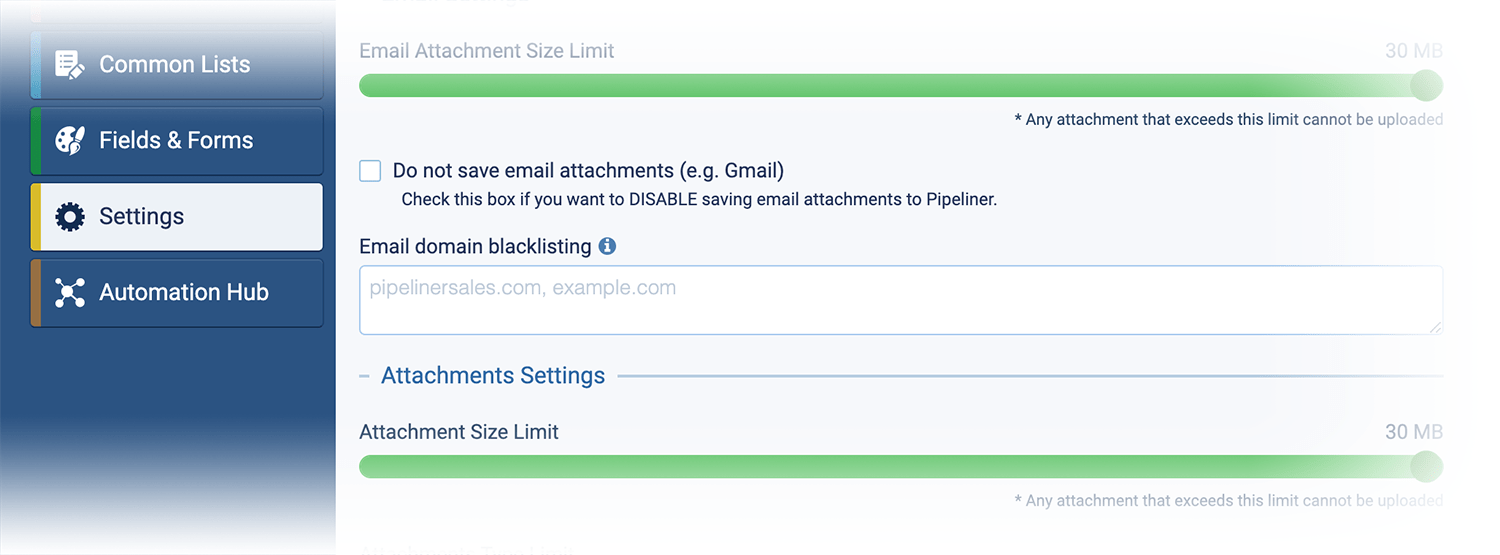
Without restrictions, your CRM feeds can become clogged with newsletters, vendor spam, and irrelevant chatter. The Pipeliner CRM Fix: By blacklisting specific domains, you ensure that only high-value, sales-relevant interactions appear in your Feeds. Your team sees exactly what they need to close the deal—nothing more.

Absolute DataData Data is a set of quantitative and qualitative facts that can be used as reference or inputs for computations, analyses, descriptions, predictions, reasoning and planning. Privacy
The most significant risk of email integration is accidental oversharing. You cannot afford for confidential internal emails (e.g., from legal or HR) to sync to an open contact record. The Pipeliner CRM Fix: Create a “Do Not Log” rule for your own company domain (e.g., yourcompany.com). Our bi-directional filtering ensures that no email sent to or received from these domains is ever captured.
Automate Your Data Cleanup
Sales reps shouldn’t waste their valuable selling time manually deleting insufficient data or cleaning up messy activity logs. The Pipeliner CRM Fix: Set your rules once in the Global Admin module. The system automatically filters out insufficient data before it ever reaches your records, keeping your records pristine without lifting a finger.
How It Works
- Global Admin Control: Manage rules for the entire organizationOrganization Organization is a cohesive group of people working together and formally bound by a shared identity (e.g., one team, company, club, etc.) and a common purpose (e.g., business growth, athletic victory, etc.). from a single dashboard.
- Bi-Directional Filtering: We check both the sender and the recipient to ensure total coverage.
- Seamless Integration: Works quietly in the background alongside your existing Office 365 or Exchange setup.
Screenshots