


In the fast-paced world of sales, every minute counts. Missed appointments mean missed opportunities. Forgotten follow-ups mean lost revenueRevenue Revenue is the amount of money a business generates during a specific period such as a year or a quarter; also called sales.. That’s why Pipeliner CRM built the Calendar View and Task Board View — two powerful, interconnected features that transform how you manage your time, tasks, and customerCustomer Customer is an individual or an organization that purchases a product or signs up for a service offered by a business. relationships.
Unlike traditional calendars that display dates, Pipeliner CRM’s views are fully interactive workspaces where you can see, manage, and act on your entire sales schedule without switching between tools. Let’s explore each feature and discover how it benefits your daily workflow.
Calendar View: Your Daily Command Center
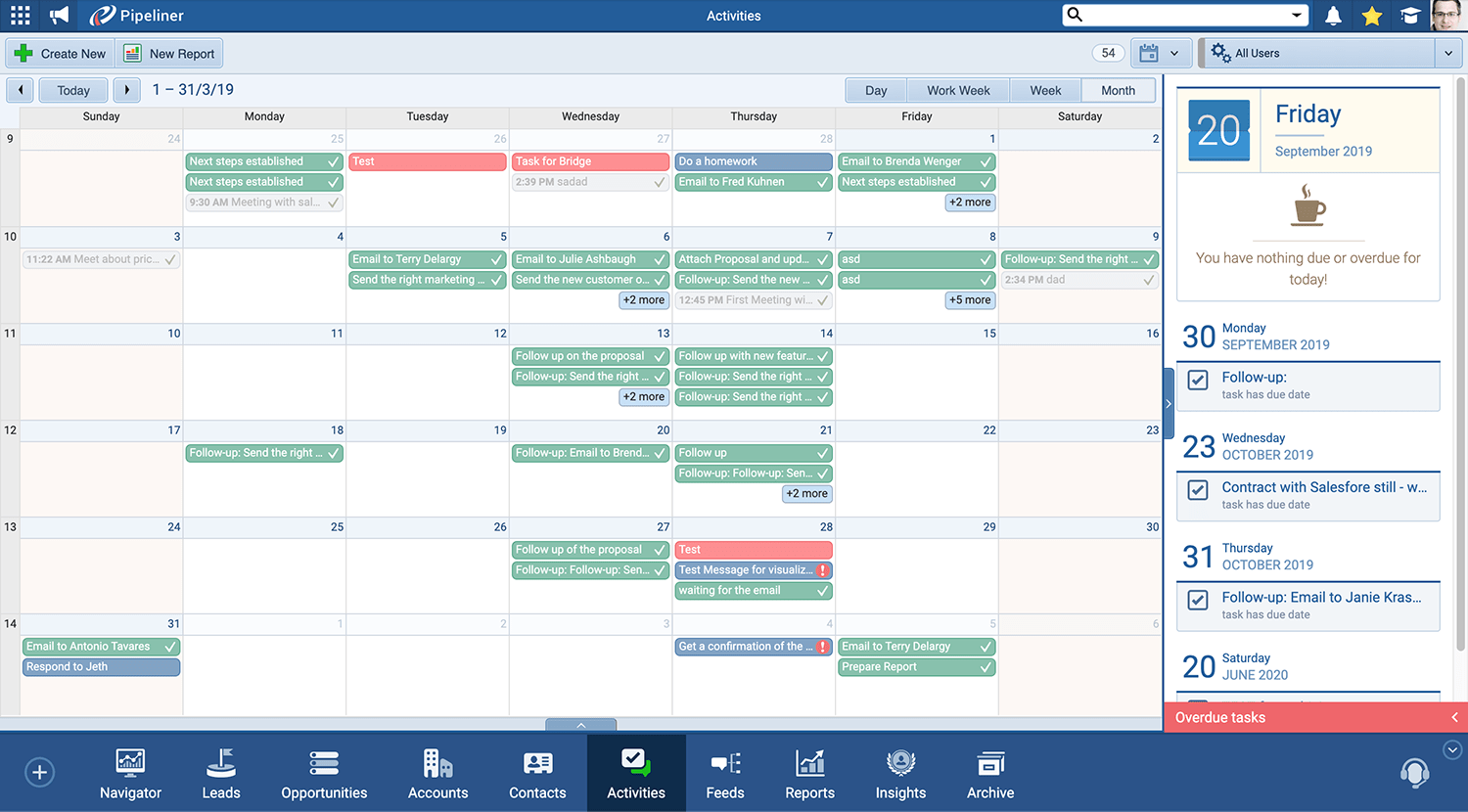
The Calendar View displays all your Appointments and Tasks within your selected date range. Choose from four flexible viewing options:
- Day View — Hour-by-hour breakdown
- Work Week View — Monday through Friday focus
- Week View — Full 7-day perspective
- Month View — Big-picture planning
Plan at any level — tactical or strategic. Whether you’re preparing for tomorrow’s clientClient A client is an entity who pays another entity for products purchased or services rendered. Also called a customer. calls or mapping out your entire quarterQuarter Quarter is a three-month period in a company’s fiscal year commonly used to make comparative performance analyses, detect or forecast business trends, report earnings, and pay shareholder dividends.’s activities, the Calendar View adapts to your planning style. Sales reps gain clarity on immediate priorities, while managers get visibility into team capacity and scheduling conflicts.
“With the Month View, I can spot gaps in my schedule and proactively book more meetings. It’s like having a bird’s-eye view of my entire sales month.”
Real-Time Activity Stream: Your Proactive Alert System
The Activity Stream panel sits alongside your Calendar View, displaying a continuously updated list of:
- Upcoming Appointments — What’s coming next
- Upcoming Tasks — What needs attention
- Overdue Items — What requires immediate action
Never miss a follow-up or deadline again. The Activity Stream acts as your personal sales assistant, surfacing the most critical items so you can stay ahead of your commitments. No more scrolling through endless calendar entries — the most essential actions are always visible.
“The overdue alerts saved me multiple times. I caught a forgotten follow-up call that turned into a $50K deal.”
Inline Editing: Work Without Interruption
Pipeliner CRM’s Calendar View is fully interactive. You can:
- Update appointment details
- Edit task information
- Add new linked activities (calls, meetings, notes)
- Modify records directly
All without leaving the Calendar View or opening separate windows.
Less clicking. More selling. Traditional CRMs force you to open records, navigate menus, and save changes across multiple screens. Pipeliner CRM eliminates that friction. Make updates in seconds and keep your momentum going. Sales reps report saving 15-30 minutes daily by editing inline.
“I used to dread updating my CRM. Now I just click, edit, and move on. It’s incredibly fast.”
Task Board View: Visual Task Management
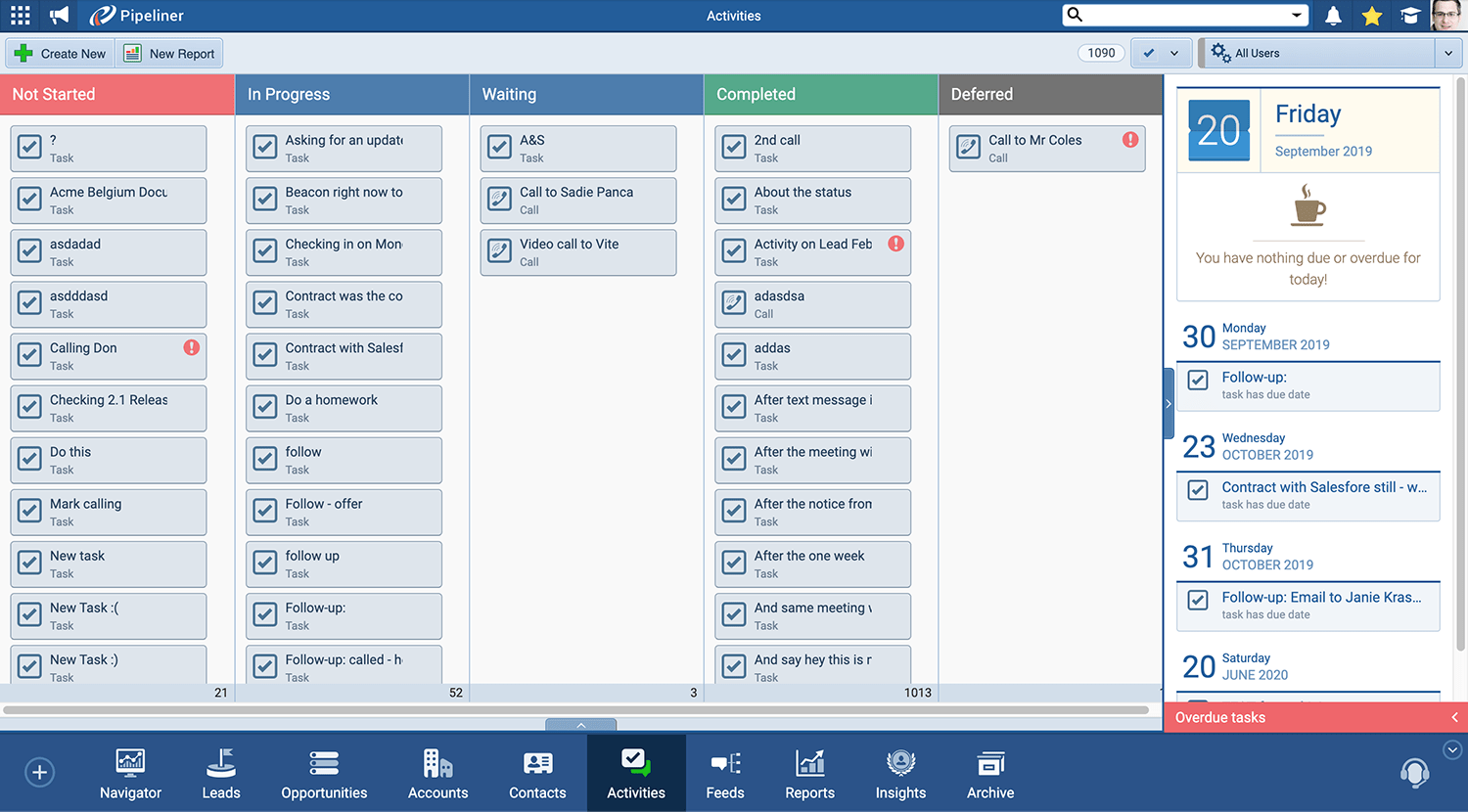
The Task Board View organizes all your tasks by Activity Status in a visual, Kanban-style board. See at a glance which tasks are:
- Not Started
- In Progress
- Completed
- Overdue
Drag and drop tasks between columns to instantly update their status.
Visualize and prioritize your workload with intuitive simplicity. For sales professionals who think visually, the Task Board transforms an overwhelming to-do list into a manageable, organized workflow. Identify bottlenecks, balance your workload, and feel the satisfaction of moving tasks to “Completed.”
“The Task Board is like having a personal project manager. I can see exactly where everything stands and what needs my attention first.”
Linked Activities: Context at Every Touchpoint
Every appointment and task in Pipeliner CRM can be linked directly to:
- Leads — Prospects in your pipelinePipeline Sales pipelineis a visual representation of the stage prospects are in the sales process.
- Opportunities — Active deals you’re working on
- Accounts — Companies you’re engaged with
- Contacts — Individual people you’re communicating with
Every interaction connects to the bigger picture. When you complete a task or finish an appointment, the activity is automatically logged against the relevant record. Your entire team gains visibility into the relationship history, ensuring seamless handoffs and informed conversations.
“When I call a prospect, I can see every previous interaction right there. No more awkward ‘remind me what we discussed’ moments.”
Multi-View Flexibility: Your DataData Data is a set of quantitative and qualitative facts that can be used as reference or inputs for computations, analyses, descriptions, predictions, reasoning and planning., Your Way
The Calendar and Task Board Views are part of Pipeliner CRM’s comprehensive multi-view system, which also includes:
- Pipeline View — Opportunities by sales stage
- Compact View — Complete record overview
- List View — Spreadsheet-style data management
- Map View — Geographic visualization
- Bubble Chart View — Multi-dimensional opportunity analysis
Switch perspectives instantly based on your immediate need. No single view fits every situation. Pipeliner CRM empowers you to see your data from multiple angles — and work actively within any view. Start your day in Calendar View, switch to Pipeline View for deal reviews, and use Task Board to prioritize your afternoon.
“I love that I’m not locked into one way of seeing my data. Different views for different moments — it just makes sense.”
Transform Your Sales ProductivitySales Productivity Sales Productivity is a metric that indicates how efficient a sales unit is at closing sales and generating revenue for the company, based on sales volume, payroll expenses, level of personnel activity and other factors. Today
With Pipeliner CRM’s Calendar View and Task Board View, you’ll:
- Gain complete visibility into your daily, weekly, and monthly schedule
- Stay ahead of deadlines with real-time activity alerts
- Work faster with inline editing and interactive views
- Prioritize smarter with visual task management
- Build stronger relationships with linked activity tracking
Publications


Screenshots

- Generally speaking, Pipeliner is used to track and review sales activities, both from the quality and quantity dimensions. This is in terms of how many calls we are making with respect to which accounts. When we do make a call, which productProduct Product refers to anything (an idea, item, service, process or information) that meets a need or a desire and is offered to a market, usually but not always at a price. lines are we discussing, and what are the exact comments? Pipeliner captures dates of those comments so we can see quality and quantity dimensions.
↳ Jake Jevric
(Vice President)
Resources
Frequently Asked Questions (FAQs)
Pipeliner CRM’s Calendar View is an interactive feature within the Activities menu that displays all your appointments and tasks organized by date. You can view your schedule by Day, Work Week, Week, or Month, and the integrated Activity Stream shows upcoming and overdue items in real-time.
Unlike standard calendar apps, Pipeliner’s Calendar View is fully integrated with your CRM data. You can edit records, update tasks, and add linked activities directly within the view — all while maintaining connections to your Leads, Opportunities, Accounts, and Contacts. It’s a workspace, not just a display.
The Task Board View is a Kanban-style visual board that organizes your tasks by Activity Status (e.g., Not Started, In Progress, Completed). You can drag and drop tasks between columns to instantly update their status, making it easy to visualize and manage your workload.
Yes! Pipeliner’s Calendar View supports inline editing. You can update appointment details, modify task information, and add new linked activities without leaving the view or opening separate windows.
The Calendar View offers four flexible options:
- Day — Detailed hour-by-hour view
- Work Week — Monday through Friday
- Week — Full 7-day view
- Month — Complete monthly overview
The Activity Stream is a real-time panel that displays upcoming appointments and tasks, as well as overdue ones. It appears alongside both the Calendar View and Task Board View, helping you stay on top of your most critical activities.
Absolutely. Every task and appointment in Pipeliner can be linked to Leads, Opportunities, Accounts, and Contacts. This ensures all activities are tracked against the relevant records, providing a complete relationship context for you and your team.
The Calendar View is located in the Activities menu. Navigate to Activities and select Calendar View from the available view options.
The Task Board View is also located in the Activities menu. Select Task Board View to see your tasks organized by Activity Status.
Yes! Pipeliner CRM is designed for seamless view switching. You can switch between Calendar View, Task Board View, List View, and other views with a single click so that you can choose the best perspective for your current task.
Yes. Depending on your permissions and role settings, managers can view team members’ calendars and task boards to monitor workload, identify scheduling conflicts, and ensure follow-ups are being completed.
Learn More About Pipeliner CRM
Take a no-obligation 14 day trial of Pipeliner CRM.
No credit card info required – just experience for yourself how it could impact your sales.